Internal Links: The SEO Win Hiding on Your Site

Search Console includes a report that ranks every page of your site by how many of your own pages link to it. Few owners ever open it, and fewer like what they find: navigation and footer pages stacked on top, real content missing entirely. We opened ours this morning and found our cookie policy outranking every post we have written. This guide walks through pulling the report, spotting orphan pages, adding links that actually carry weight, and checking a month later that Google noticed. The whole first pass takes about thirty minutes and needs no tools beyond a free Search Console account.
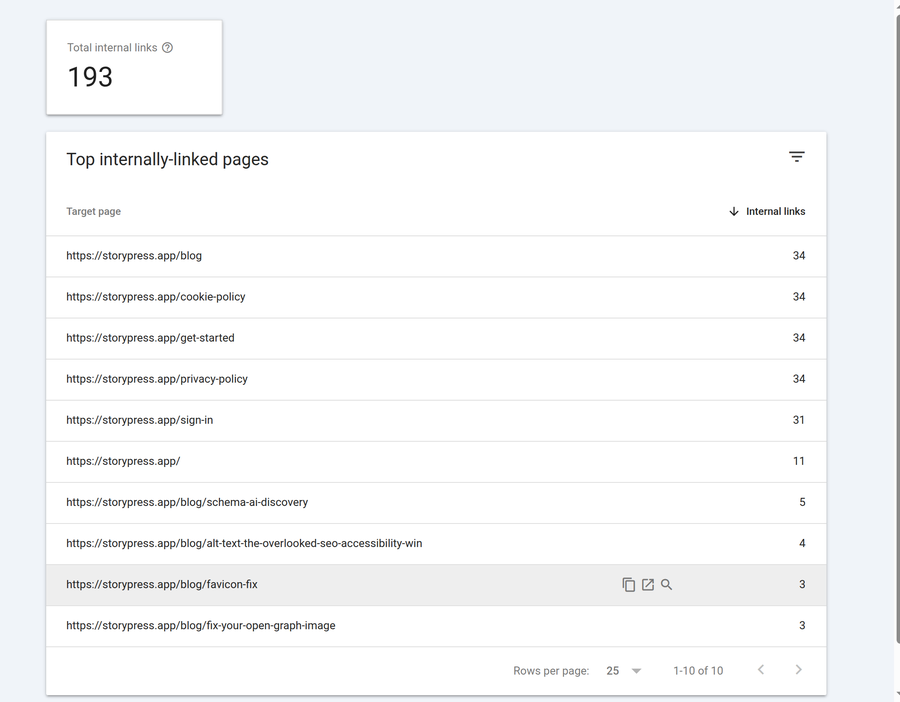
Google keeps a public scorecard of your website that most owners have never opened. It is called the Links report, it lives inside Search Console, and it lists the pages on your site that collect the most links from your other pages. Google reads that list as a map of what you think matters. This morning we opened ours, and the map said our most important pages were the cookie policy, the privacy policy and the sign up page.
Every blog post we spent days writing sat below them. Most did not appear at all. Out of more than thirty posts, exactly four had even a single internal link pointing at them. The rest are reachable only through the blog index, one click at a time, like books in a library where the only catalog entry is "books."
That is not a Google problem. It is a wiring problem, it is extremely common on small sites, and it takes about thirty minutes to start fixing. Here is the repair, step by step, using our own site as the honest example.
What internal links actually do
An internal link is any link from one page of your site to another page of the same site. It does three jobs at once. First, discovery: Google's SEO starter guide states that Google primarily finds pages through links from other pages it already crawled. A post nothing links to is a post Google has to stumble on. Second, importance: Google's link best practices open by saying links are a signal it uses when determining the relevancy of pages. Your links tell Google which of your pages deserve attention. Third, people: a reader who finishes a page with no next step leaves. A reader who gets a relevant link reads two pages instead of one.
Step 1: Pull your own Links report
Open Search Console, pick your property, and select Links in the left menu. The right hand panel, Top linked pages, internally, is the list that matters here. Select More at the bottom of it to see every page Google has counted.
How to check it worked: the drilldown shows a total at the top. If a page you care about is missing from the list entirely, Google found no internal links to it at all. On our property the drilldown held ten rows for a site with more than forty pages. The missing thirty are the point.
Step 2: Read it for the two failure patterns
Pattern one: utility pages on top. Pages that sit in your navigation or footer collect a link from every single page, so a cookie policy piles up dozens of them while real content earns none. Some of that is unavoidable plumbing. It becomes a problem when, like on our site, the plumbing is the entire list. Pattern two: orphan content. Posts and service pages that no other page links to in the body text. They rank worse, get crawled less often, and send readers nowhere when they do get found.
Step 3: Add the missing links where they carry weight
Start with your three or four best pages: the ones that already get impressions, or the ones that earn you money. For each, find two or three related pages on your own site and add a link inside a sentence where the connection is natural. The anchor text, the visible words you link, should name what the destination is about. Google's guidance is blunt about this: good anchor text is descriptive and reasonably concise, and "click here" tells neither people nor Google anything.
| Weak anchor text | Better anchor text |
|---|---|
| Click here to learn more | our guide to picking image formats |
| Read more | how to fix a favicon that will not show up |
| https://yoursite.com/blog/some-long-url-pasted-raw | what each warning in an SEO audit means |
| We wrote about this on our blog | our breakdown of review schema |
We did exactly this today: the post you are reading links to our image formats guide, our favicon fix and our SEO audit report explainer, three posts that had almost no internal links this morning. That is the whole technique. No plugin, no tool, just sentences with links in them.
Step 4: Make it part of publishing, not a project
A one time sweep decays. The habit that sticks is small: every time you publish a page, add two or three links from it to older related pages, then open ONE older related page and link back to the new one. Five minutes, every publish day. On a StoryPress site you can hand the chore to the built in assistant: tell Claude "link this new post from the three most related older posts" and the edits are made for you. And because StoryPress redirects the old address automatically when a page's slug changes, the links you add today keep working even if you rename pages later.
Step 5: Verify it worked
Internal links show up in the report only after Google recrawls the pages that carry them, so this is a weeks scale check, not a same day one. Google's own guidance says to wait a few weeks before judging whether a change had an effect. Put a note in your calendar: one month from your linking pass, reopen the Links report. The pages you linked should now appear in the drilldown, or have moved up it. We will be doing the same with ours, in public, in a follow up.
Do and don't, on one screen
Do
Link from your strongest pages to the pages you want to rank
Use anchor text that names the destination topic
Add 2 or 3 links to older posts every time you publish
Open your Links report every month or two and rescan the top ten
Don't
Stuff ten links into one paragraph; three relevant ones beat ten forced ones
Link every mention of a phrase; once per page is enough
Rely on a Related posts widget alone; a link inside a sentence carries the context
Point links at pages that no longer exist; fix those first
“If Google's own report says your cookie policy is the most linked page on your site, your best work is invisible by your own hand.”
The thirty minute version
Open Search Console, then Links, then the internal Top linked pages drilldown. (3 minutes)
List your pages that are missing from it, and note which utility pages dominate. (5 minutes)
Pick your three best pages and add two or three descriptive links to related pages from each. (15 minutes)
Add the publish day habit: two links out, one link back, every new page. (ongoing, 5 minutes each)
Calendar a one month check of the same report. (2 minutes)
None of this requires touching code or buying a tool. It is the cheapest ranking work you can do this week, and unlike most SEO advice, you can watch the result arrive in Google's own report.

H1, H2, H3: Get Your Heading Structure Right
Website audits keep flagging the same quiet problem: heading levels used in the wrong order. It sounds like pedantry until you see who depends on them. Screen reader users navigate by headings more than any other method. Google reads them to understand what each section is about. AI assistants treat them as your page's table of contents. This guide shows you the outline your page presents to all three readers, the four rules that actually matter, and how to check and fix everything in about ten minutes, no code required.