Customer Reviews That Actually Sell

Nearly every potential customer now reads reviews before choosing a business, and a rising share will not look below 4.5 stars. Meanwhile the typical small business site parks its best praise on a testimonials page nobody opens, with no markup machines can read. This guide works both sides: how to collect reviews without breaking platform rules, which ones persuade, where on the page they change minds, and the review schema that lets Google and AI assistants read them, validated live while we wrote it.
BrightLocal's 2026 Local Consumer Review Survey put numbers on something every small business owner feels: 97 percent of consumers read reviews before choosing a local business, 41 percent now read them every single time, and a growing share will not consider anything under 4.5 stars. Yet most small business websites either hide their best reviews on a page nobody visits, or display them in a way neither Google nor an AI assistant can read.
This guide covers both halves of the job: the human half (getting reviews and placing them where they change minds) and the machine half (the schema markup that lets search engines and AI assistants read them). Five steps, each with a check at the end.
Step 1: Get reviews without breaking the rules
The single biggest driver of review volume is simply asking, and the single biggest mistake is how. Ask at the peak moment: the day the project finishes, the hour after the delivery lands, the moment a customer says thank you. A text or email with a direct link to your Google review form removes every excuse.
One bright legal line: ask for a review, never for a positive review. Prompting only happy customers or requesting explicitly positive feedback violates Google's policies, and regulators in the US and UK have started fining businesses for review gating. The ask is 'Would you leave us an honest review?', full stop.
Check it worked: count your Google reviews today, ask every customer for the next two weeks, count again. If the number did not move, your ask is arriving at the wrong moment or with too many clicks in the way.
Step 2: Choose reviews that actually persuade
Not all five star reviews are equal. 'Great service, highly recommend' from A.B. persuades no one because any business could have typed it. The reviews worth showcasing have three ingredients: a specific detail only a real customer would know, a named human (first name and last initial is enough), and a recent date. Recency now matters almost as much as the star count: BrightLocal found consumers increasingly discount reviews older than a few months, because an old review describes a business that may no longer exist.
Check it worked: read your chosen review and ask whether a competitor could paste it on their site unchanged. If yes, pick a more specific one.
Step 3: Put them where decisions happen
The default move is a testimonials page linked from the navigation. Analytics on almost any small business site tell the same story: that page is among the least visited on the site. Reviews work when they sit next to the decision they support:
One review about your lawn renewal package on the lawn renewal page, not in a general pile.
A short review within sight of every 'Book now' or 'Get a quote' button.
Your overall star rating and review count near the top of the homepage.
Keep the testimonials page if you like, but treat it as the archive, not the strategy.
Check it worked: open your most visited service page on your phone. If you can reach the contact button without passing a single piece of customer proof, you have a placement gap.
Step 4: Add review schema so machines can read them
Everything above is for humans. Schema markup is the same information rewritten for machines: a small JSON-LD block in the page that labels 'this is a review, this is the rating, this is the author'. Search engines use it to understand your page, and AI assistants lean on structured data when deciding which businesses to cite. Reviews marked up this way look like this:
<script type="application/ld+json">
{
  "@context": "https://schema.org",
  "@type": "Review",
  "itemReviewed": {
    "@type": "Product",
    "name": "Spring Lawn Renewal Package",
    "description": "Aeration, overseeding, and first-cut package.",
    "brand": {"@type": "Brand", "name": "Maple Lane Lawn Care"}
  },
  "reviewRating": {"@type": "Rating", "ratingValue": 5, "bestRating": 5},
  "author": {"@type": "Person", "name": "Dana R."},
  "datePublished": "2026-09-12",
  "reviewBody": "Our backyard was half mud in March. After the
  renewal package it was fully green by Memorial Day."
}
</script>
One honest nuance most guides skip: Google calls reviews of your own business on your own site self-serving, and no longer shows star rich results for LocalBusiness or Organization markup of that kind. Mark up reviews against the specific service or product they describe instead, as in the example above. That keeps the markup truthful, keeps products eligible for review snippets, and still hands AI assistants clean structured facts either way. Two more rules: the marked-up review must be visible on the page, word for word, and the markup must never contain a review that does not exist. Google's review snippet documentation lists the required fields.
Timing note: Google retired FAQ rich results in May 2026, which made review snippets one of the few rich result types still worth a small business's effort.
Step 5: Validate, then verify in the wild
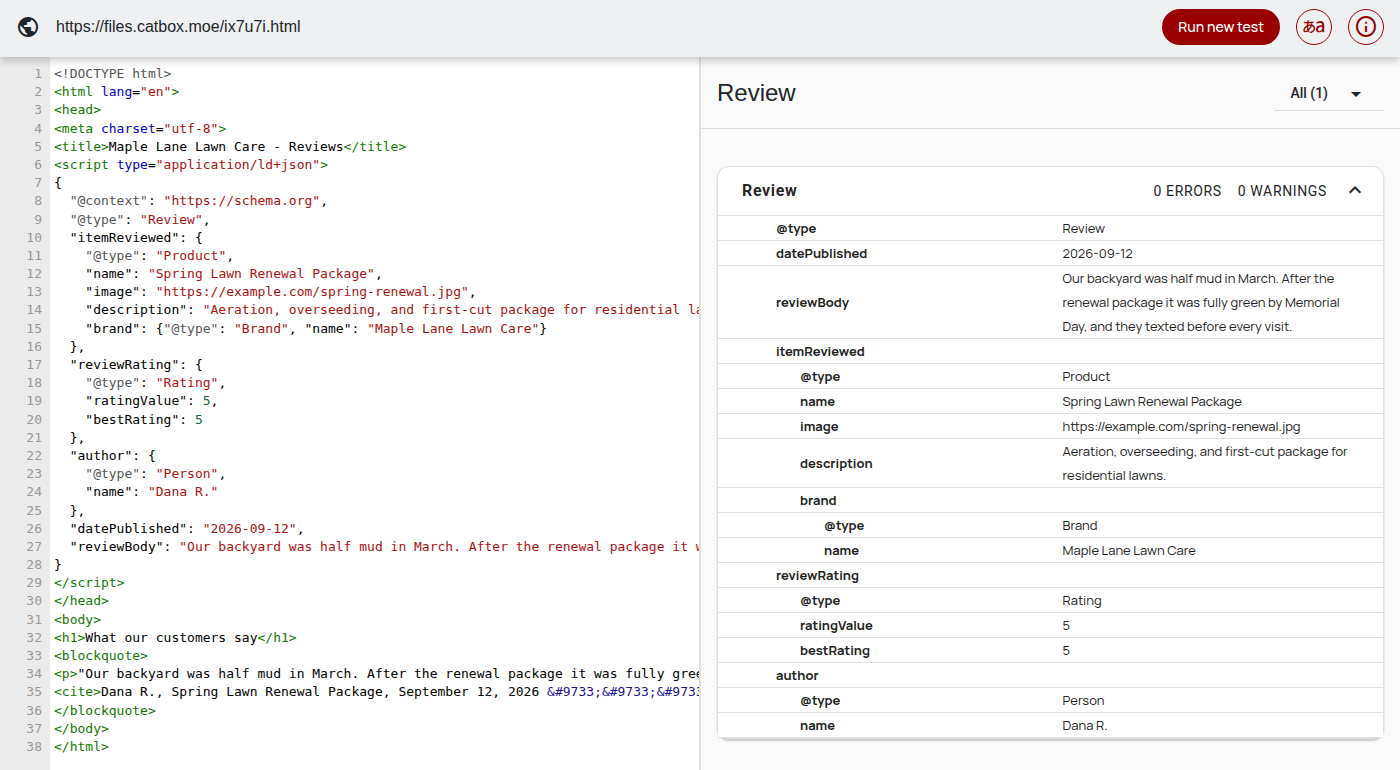
Markup you have not tested is a guess. We built the exact example page from Step 4, put it online, and ran it through the free Schema Markup Validator while writing this post:
To verify your own site:
Paste your page URL into validator.schema.org. You want your Review object listed with 0 errors.
Run the same URL through Google's Rich Results Test to see which rich results the page is eligible for.
After a few weeks, check Search Console under Enhancements for the review snippets report. Impressions there mean Google is reading your markup in production.
The part you maintain
Do
Ask right after the good moment: the delivery, the fixed leak, the five star text message.
Use full reviews with a first name, a date, and the specific service bought.
Refresh them. A 2023 quote on top signals a business that stopped getting praise.
Put one relevant review next to each service and each buy button.
Don't
Ask for 'a positive review'. Asking for explicitly positive reviews violates review platform rules, and in some places the law.
Display 'Great service! - J.' Anonymous and vague reads as invented.
Dump everything on one testimonials page and consider the job done.
Invent or buy reviews. Platforms and consumers are actively hunting fakes.
A footnote on platforms: some of this plumbing can come built in. StoryPress pages, for example, ship with base JSON-LD automatically (Article markup on every post, Product markup with live pricing on the pricing page), so the foundation exists before you add review markup on top. On any platform, the workflow is the same: real reviews, placed beside decisions, marked up truthfully, validated before you trust them.
“A review nobody sees persuades nobody. Placement first, markup second, and never a fake anywhere.”
None of this requires a developer or a budget. It requires asking at the right moment, choosing reviews with names and specifics, moving them next to your buy buttons, and twenty minutes with a JSON-LD block and a validator. The 97 percent are already reading. The only question is whether they are reading yours.
One practical website guide, twice a week. No panic, no jargon.

JPG, PNG, or WebP? A No-Jargon Guide
Most slow small business websites share one quiet culprit: photos uploaded straight from a phone or a stock library, in whatever format they arrived. This guide skips the theory and starts from a test we ran ourselves, one photo saved three ways with an 8.5x size difference between them. You will learn what JPEG, PNG, WebP, and SVG are each actually for, the five second decision rule, the free tool that converts anything, and the three checks that prove your fix worked.