Sell Gift Cards Online Without a POS System

Every December the counter question returns: do you do gift cards? For a lot of salons, studios and tutors the honest answer is no, because somewhere along the way gift cards got filed under point-of-sale hardware. They are not hardware. A working gift card setup is a way to take money, a unique code, and a ledger of balances, and all three run fine from a normal website. This guide prices cards people actually want to give, compares three no-POS ways to sell them with real fees, covers the federal five-year expiry rule, and ends with a test run to do before you announce anything.
Gift cards sit at the top of this season's wish lists. In the National Retail Federation's October 2026 holiday survey, 47 percent of shoppers said they would like to receive one, which puts gift cards ahead of clothing, books and beauty products.
For a salon, a massage studio, a cleaning company or a pottery class, that demand arrives every December as the same question at the counter: do you do gift cards? A surprising number of service businesses answer no, because the owner once looked into it, saw the words point of sale, and filed the whole idea under hardware they do not own.
Here is what the hardware actually does. A gift card system is three small parts that have to agree with each other:
If you can take a payment online, generate a code, and keep a spreadsheet honest, you can sell gift cards from the website you already have. The rest of this guide sets that up, with real fees and the one federal rule you need to know.
Step 1: Price cards as services, not numbers
A $50 gift card is a number. One 60-minute massage is a gift. The person buying is almost never your customer; they are your customer's sister, and she wants to say "I got you a massage," not "I got you fifty dollars."
So pick two or three amounts that map exactly to things you sell, and name them. If your 60-minute massage costs $90, sell a $90 card called exactly that. Amounts tied to services also kill the awkward leftover balance: a $50 card against a $90 service helps nobody.
Check it worked: show your amounts to someone who has never bought from you. If they can tell you what each one buys without asking, the pricing is right.
Step 2: Pick one of three routes
| Payment link + spreadsheet | Gift card service (Gift Up) | Square eGift Cards | |
|---|---|---|---|
| Monthly cost | $0 | $0, no setup fee | $0 with a Square account |
| Cut of a $90 card | Your processor's fee only | $3.14 (3.49%) plus your processor's fee | Square's processing fee on the sale |
| Who makes the code | You do | Automatic | Automatic |
| Who tracks balances | Your spreadsheet | Their dashboard | Square dashboard |
| Lives on your site | Yes, a button or link | Yes, an embedded checkout | Links out to a Square-hosted page |
| Best when | A handful of cards a month | You want it automatic on any site | You already take payments with Square |
A payment link and a spreadsheet is the zero-new-tools route. Stripe, PayPal and Square all let you create a hosted payment link with no code, one per amount. The buyer pays, you get an email, you send them a code you made up, and you write it in the ledger. It works, and for a business selling a handful of cards a month it is genuinely enough. The catch is that you are the automation: every card sold is a task on your plate, including the ones bought at 11pm on December 23rd.
A gift card service takes over parts two and three. We will use Gift Up as the worked example because its pricing is public and simple: no monthly fee, no setup fee, and 3.49 percent per card sold, with a 50 cent minimum. On that $90 massage card, Gift Up keeps $3.14 and the buyer gets the card by email the moment they pay, with a code generated, a balance tracked, and nothing on your plate. You connect your own payment processor and pay its usual processing fee on top, as you would for any online sale. That 3.49 percent is buying the two parts of the system you least want to run by hand in December.
Square eGift Cards is the shortcut if you already take payments with Square, even just the little card reader at your front desk. In the Square dashboard, under Items and services, there is a Gift Cards section with a toggle to sell eGift cards online. Square then hosts an ordering page for you, and you link to it from your website. No new account, and balances live where your other sales already do.
Step 3: Put it on the website people already visit
Whichever route you picked, buyers will not find a payment link in a drawer. They will look at your website, in December, often from a phone. The page they need is short. Here is one we built for a fictional day spa while writing this guide:
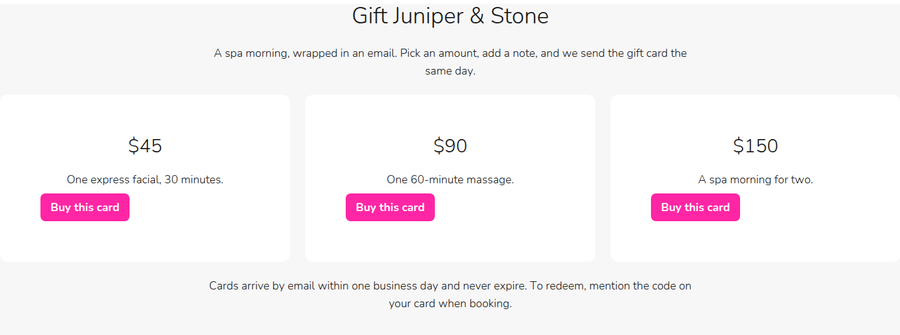
Five things, and the screenshot has all of them: the business name in the headline, each amount with the service it buys, one buy button per card, how the card arrives, and how to redeem it. That last line matters more than it looks: "mention the code when booking" removes the recipient's fear of an awkward counter moment, which is the main reason service gift cards go unredeemed.
The example above is a StoryPress page, and building it took one request: we described three cards and a redemption line in plain English, and the section is what came back. That is the general point, not a plug for any one builder: this page is simple enough that nothing should stop you shipping it this week. If you are doing a bigger seasonal pass anyway, our holiday checklist covers the rest of the site.
Step 4: Keep one honest ledger
If you went the DIY route, the ledger is a spreadsheet with six columns: code, amount, date sold, buyer's email, remaining balance, and notes. The one rule that keeps it honest: the balance changes the moment the service is booked, not later, and it changes in exactly one place. Most gift card horror stories are really two-ledgers stories, one at the desk and one in an inbox, disagreeing in front of a customer.
Two legal points belong in this step, because they are about what the ledger promises. Under US federal rules for gift cards, in place since 2010, the money on a card cannot expire for at least five years from purchase or last reload, and inactivity fees are only allowed after a full year without use, disclosed up front. Several states go further and ban expiry entirely. The simplest policy is also the best marketing: no expiry, ever, written right in the card email. You sold the promise; let it stay good.
Step 5: Test the loop before you announce it
Before the link goes in your navigation, buy the smallest card yourself, from your own phone, with a real payment.
Buy it. The money should land in your account and the card email should arrive without you touching anything you did not expect to touch.
Redeem half of it. Book the service, mention the code, and update the balance the way you really would on a busy day.
Read the ledger. The remaining balance should be right, in one place, with no memory required.
If any step relied on you remembering something, write that something into the process now, while it is cheap. In December it will not be.
Do
Tie every amount to a named service
Put a gift card link in your nav before Thanksgiving
Answer "how do I redeem this?" on the page itself
Test the whole loop with a real purchase
Write "never expires" into the card email
Don't
Wait for a POS to give yourself permission
Sell amounts that map to nothing you offer
Track balances in two places
Set an expiry date under five years
Make the buyer print anything
“A gift card is a promise with a code attached. The system only has to remember the code and keep the promise.”
The short version
A gift card system is three parts: payment, code, ledger. None of them is hardware.
Tie amounts to named services, so the card is a story and not a number.
Under about five cards a month, a payment link and a spreadsheet are enough. Beyond that, a service like Gift Up charges 3.49 percent per card to run the code and the ledger for you. Already on Square? Toggle on eGift cards.
Federal rules say card funds last at least five years. Promise no expiry and say so.
Buy and redeem a card yourself before you tell anyone.
The season is the deadline: in the same NRF survey, nearly two thirds of shoppers said they plan to do most of their buying from Thanksgiving weekend on. A gift card page shipped this week is live before the rush, and it sells the one thing you can deliver instantly to someone who cannot decide: the choice itself.

Request Indexing: What the Button Really Does
Every site owner meets this button eventually. A page is missing from Google, Search Console offers a link called Request Indexing, and clicking it feels like progress. Then the page stays missing, and the clicking becomes a daily habit. This guide checks that habit against what Google actually promises the tool does, which is less than most people assume. Five common beliefs about the button, measured against the documentation, the two situations where it genuinely earns its place, and the publish-day routine that gets pages indexed without touching it.