Request Indexing: What the Button Really Does

Every site owner meets this button eventually. A page is missing from Google, Search Console offers a link called Request Indexing, and clicking it feels like progress. Then the page stays missing, and the clicking becomes a daily habit. This guide checks that habit against what Google actually promises the tool does, which is less than most people assume. Five common beliefs about the button, measured against the documentation, the two situations where it genuinely earns its place, and the publish-day routine that gets pages indexed without touching it.
The ritual is always the same. A page is missing from Google, so you open Search Console, paste the URL, and click Request Indexing. A green confirmation appears, nothing happens for a few days, and you click again. Google's own documentation describes what that button does in two blunt sentences: submitting a request does not guarantee that the page will appear in the index, and requesting a recrawl multiple times will not get it crawled any faster.
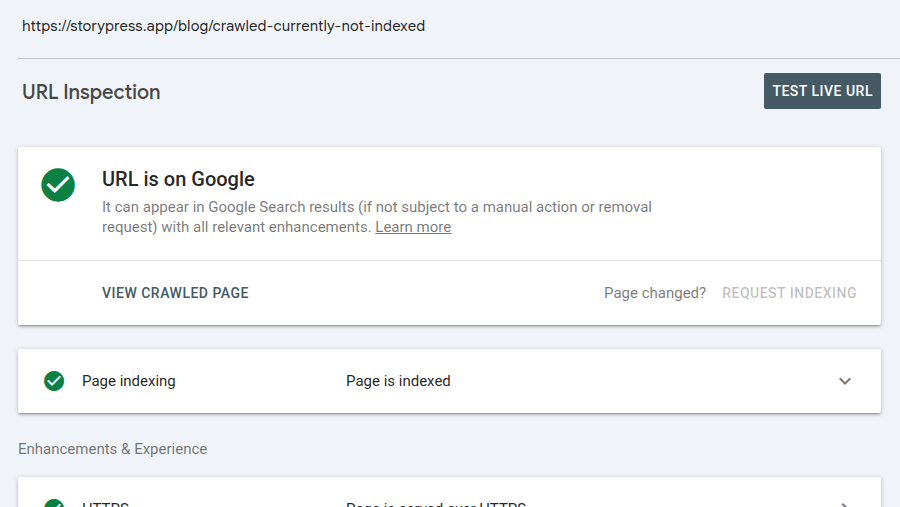
So what does the click buy you? Exactly one thing: your URL joins Google's crawl queue sooner than it otherwise might. Here is the button in its natural habitat, captured in our own Search Console:
Everything after the queue runs on the same machinery whether you clicked or not:
That picture is the whole argument of this post. The button touches the first hop and nothing else. With that in place, the five most common beliefs about it sort themselves out quickly.
Myth 1: The button gets your page indexed
The button requests a crawl. A crawl is a visit, not an acceptance. After Googlebot fetches the page, the same evaluation runs that decides the fate of every URL Google finds by any route, and Google's documentation for the tool says plainly that a request does not guarantee the page will appear in the index. If the page would have been declined when found through a link, it will be declined when found through the button.
Myth 2: Clicking again speeds things up
Google's recrawl guidance could not be more direct: requesting a recrawl multiple times for the same URL will not get it crawled any faster. The second click does nothing, and there is a daily limit on requests per property, so repeat clicking spends quota you might want on launch day. One click per URL per real change is the entire useful range of this tool.
Myth 3: The results are instant
The confirmation message is instant. The crawl is not. Google says indexing after a request typically takes about a day but can take much longer, and that crawling in general can take anywhere from a few days to a few weeks. That lag is normal, not a signal that something failed. The practical rule: click once, note the date, and do not diagnose anything for a week.
Myth 4: This is how Google is supposed to find your pages
The button is a manual override for a handful of URLs, which is why the quota exists. The designed route is the one that needs no clicks at all: a sitemap that lists every page, plus internal links from pages Google already visits. Google's recrawl guidance itself redirects you there the moment you have more than a few URLs: if you have large numbers of pages, submit a sitemap. We never click the button for routine posts on this blog. StoryPress keeps the sitemap current on every publish, so announcing new pages to Google is part of what the $5 a month already pays for, and the queue finds our posts on its own.
Myth 5: "URL is on Google" means people can find you
The verdict in the screenshot above means the page is eligible to appear in results, and Google's documentation warns that even this does not guarantee it is actually showing. Ranking is a separate contest. The most-shown page on our own blog appeared in 429 searches in the last 28 days and was clicked zero times, because it averages position 27. Indexing put it in the race; position decides whether anyone sees it run. If your traffic problem survives a green verdict, you have a ranking problem, not an indexing one.
When the button is the right tool
Two situations genuinely call for it: a brand-new site that has no crawl history yet, and an important page you just corrected, like a wrong price, a bad headline, or an outdated legal line you want replaced in results quickly. Most other cases are better served elsewhere:
| You just... | Click the button? | The move that works |
|---|---|---|
| Launched a brand-new site | ✓ | Click for the homepage, and submit your sitemap |
| Fixed a wrong price or headline on a key page | ✓ | One click, then leave it alone |
| Published a routine new post | ✗ | Your sitemap and internal links already announce it |
| Have dozens of pages waiting | ✗ | Submit a sitemap; the button has a daily limit |
| See 'Crawled - currently not indexed' | ✗ | Improve the page; the queue is not the problem |
| Blocked the page with noindex or robots.txt | ✗ | Remove the block first; no crawl request overrides it |
The fifth row deserves its own note. If Search Console says Crawled - currently not indexed, Google has already visited the page and declined it. The button can only cause another visit, and another decline. The fix lives in the page, not in the queue.
The publish-day routine that works
Publish, and link the page from somewhere. A page no other page points to is invisible twice over. Your blog index, a related post, or your navigation all count.
Confirm your sitemap lists it. Open yoursite.com/sitemap.xml and find the new URL. On platforms that rebuild the sitemap automatically you are just confirming; on platforms that do not, this is the step people miss.
Spend your one click where it matters. Launch day, or an urgent correction: inspect the URL, click Request Indexing once, and stop.
Check back in a week with URL Inspection. The panel tells you where the page stands. A green verdict closes the loop. 'Crawled - currently not indexed' means improve the page. A robots or noindex note means remove the block, and that is the one moment a second click is justified: after a real change.
Do
Keep a sitemap submitted and current
Link every new page from somewhere visible
Use the button for a launch or an urgent fix
Wait a week before judging the result
Check back with URL Inspection, not re-clicks
Don't
Click daily for the same URL
Use it as your publishing workflow
Expect it to fix a noindex tag or a robots block
Expect it to rescue thin or duplicate pages
Read 'URL is on Google' as 'people can find me'
“The button decides when Google looks. The page decides what Google does.”
The short version
The button requests a crawl sooner. That is all it does, per Google's own docs.
Repeat clicks change nothing and burn a limited daily quota.
Expect days, sometimes weeks. Silence is not failure.
Sitemaps and internal links are the real indexing workflow; the button is for launches and urgent fixes.
A green verdict means eligible, not found. Ranking is the next fight.
The honest summary of Request Indexing is that it is a perfectly good tool for a very small job. Use it twice a year, on the days it was built for, and let the boring machinery do the rest.

Your Followers Are Rented. Your Website Isn't
The account you post from is not yours. The platform can change what your followers see, lock you out after a hack, or close the account, and there is no phone number to call when it happens. Most businesses learn this the expensive way, after years of treating a profile as their only storefront. This guide is the calm version of that lesson: a ten minute audit of what you actually own, a landing page that turns followers into contacts you can export, and a monthly check that shows the shift working. Social stays in the plan. It just stops being the whole plan.