Your Followers Are Rented. Your Website Isn't

The account you post from is not yours. The platform can change what your followers see, lock you out after a hack, or close the account, and there is no phone number to call when it happens. Most businesses learn this the expensive way, after years of treating a profile as their only storefront. This guide is the calm version of that lesson: a ten minute audit of what you actually own, a landing page that turns followers into contacts you can export, and a monthly check that shows the shift working. Social stays in the plan. It just stops being the whole plan.
You worked for every one of your 1,000 followers. When you post today, Instagram will show it to about 66 of them, and Facebook to about 43. Those are the averages for small brand pages in Socialinsider's study of 140 million organic posts from January 2025 to August 2026, and the share shrinks as pages grow: the largest pages in the study reach half of one percent of their Facebook followers.
The trend points down, too. Instagram's average reach rate fell 14% year over year in the same study. And the feed keeps getting less predictable: in October 2026 Meta rolled out Your algorithm, which lets every Facebook user tell the feed in plain words what to show more and less of. Your next post now competes with every instruction your followers have ever typed into it.
| Followers | Instagram reach | Facebook reach |
|---|---|---|
| 1,000 to 5,000 | 6.65% | 4.35% |
| 5,000 to 10,000 | 5.75% | 3.40% |
| 10,000 to 50,000 | 5.50% | 2.70% |
| 50,000 to 100,000 | 4.50% | 1.50% |
| 100,000 to 1 million | 3.50% | 0.50% |
None of this says quit social media. It says stop treating it as the place your audience lives. Followers are an audience you rent: the platform holds the list, sets the terms and can change them overnight. An email list and a website are the version you own. The five steps below move your audience from one side to the other.
Step 1: Count what you actually own
Open a note and write down three numbers:
Followers, per platform
Email subscribers
Website visits in the last month
Then mark each one: can you download it as a file? An email list exports in one click. A follower list exports nowhere, and that difference is the whole game. In a CNBC report on small-business account hacks, granola maker Pat Bennett lost her Instagram and Facebook accounts to a phishing message and never got them back, despite using every recovery channel Meta recommends. Another owner in the same report lost a Facebook group with 300,000 members. Their audiences did not shrink. They vanished in an afternoon.
How to check it worked: you have three numbers on paper, and for each an honest answer to one question: if this account disappeared tomorrow, could I still reach these people?
Step 2: Build the page your bio should link to
Most bio links point at a homepage built for strangers. Build a small page for social visitors instead: greet them, offer the one or two actions they actually came for, and put an email box underneath. Here is the one we built while writing this post:
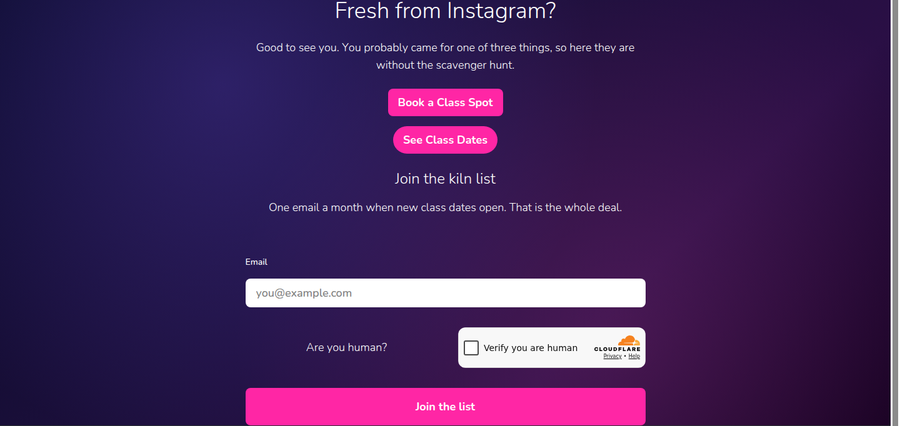
Nothing on it is clever, which is the point: a greeting that matches where the visitor came from, two buttons, one email field. We made ours by describing it to Claude on a StoryPress site, and at $5 a month the whole site costs less than one boosted post, which is the right price for a page whose only job is to quietly collect the audience you already earned. On any platform, the same page takes an evening at most.
How to check it worked: open your own profile on a phone, tap the bio link, and count taps to a booking, purchase or signup. One or two is right.
Step 3: Give followers a reason to become contacts
Nobody joins a list to stay updated. People join for something specific: the email that goes out when new class dates open, a first-order discount, the Thursday note listing what came into the shop. Pick one, state it plainly next to the email box, and pin a post that points at the page.
The quiet advantage shows up the first time you use it. A message to your list does not have a reach rate. It lands in inboxes instead of competing in a feed, and the list comes with you if you ever change platforms, tools or hosts.
How to check it worked: one real signup in the first week. One is enough to prove the pipe works.
Step 4: Publish at home, point social at it
The hours you spend making content are an investment, so store the asset on land you own. Put the full guide, menu, portfolio or announcement on your website, then give social the short version with a link home. Pages on your own domain compound: our small blog collected about 1,300 search impressions on Google in the last 28 days, and those appearances repeat every month without anyone reposting anything. The same pages are what AI assistants read when someone asks them for a recommendation. A Reel is gone from the feed in days; a page keeps answering searches for years.
How to check it worked: search Google for your business name plus the topic you just published. Your own page should be the one that answers.
Step 5: Recheck the three numbers monthly
Same three numbers as step 1, once a month, in the same note. Email subscribers should climb a little every month, and site visits follow them. Follower counts can do whatever they like, because their job has changed: social is where new people discover you, and the page from step 2 is where they stop being borrowed.
Do
Point every bio link at a page you control
Give social visitors their own landing page
Offer one specific reason to join your list
Publish in full on your site, tease on social
Export your email list to a file every month
Don't
Keep your prices only on Instagram
Buy followers to fight falling reach
Link your bio to a homepage built for strangers
Post the full content natively and let your site go stale
Delete your accounts, since discovery still starts there
“Meet new people on social media. Keep them somewhere you own.”
The one-hour version
Write down followers, email subscribers and monthly site visits
Build one landing page: greeting, two actions, one email box
Point every bio link at it and pin a post naming the reason to join
Move full content to your site; social gets the teaser and the link
Recheck the three numbers monthly
Keep posting. Keep meeting people where they scroll. Just stop keeping the only copy of your audience on land you do not own.

Does Your Website Need a Second Language?
A second language sounds like a big-company project, so most owners never check whether their own visitors are already asking for one. The evidence is free: Search Console lists every country where your site appeared and every search that found it, including the ones typed in German or Spanish. This guide shows how to read those two reports, a one-question test for whether translation deserves your time, the three pages to translate first, what the honest tools cost, and how to confirm Google can find the new pages.