Alt Text That Actually Works: A Plain-English Guide for Small Business Websites

Somewhere on your website right now there's an image named IMG_4302.jpg with no description at all. To you it's the photo of your storefront. To a blind visitor using a screen reader, it's the word 'image' said out loud, followed by silence. To Google, it's nothing. Fixing this is one of the fastest wins in web publishing, and almost nobody does it right.
What alt text actually is
Alt text (alternative text) is a short written description attached to an image in your website's code. Visitors with normal vision never see it. But it's doing three jobs at once behind the scenes:
Screen readers read it aloud to blind and low-vision visitors — roughly 2% of your traffic, more if your customers skew older.
Google reads it to understand what your image shows, which affects both image search and your page's overall relevance.
Broken images display the alt text in place of the picture when a file fails to load, so visitors on bad connections still know what was there.
One field, three audiences. Here's what the difference actually sounds like:
The formula: describe the picture like you're on the phone
Imagine a friend is on the phone and you need to tell them what's in the image. You wouldn't say 'image' or 'photo1-final-v2'. You'd say something like 'our head barber giving a fade in the Brooklyn shop.' That's it — that's good alt text.
Here's the idea applied to a real photo:
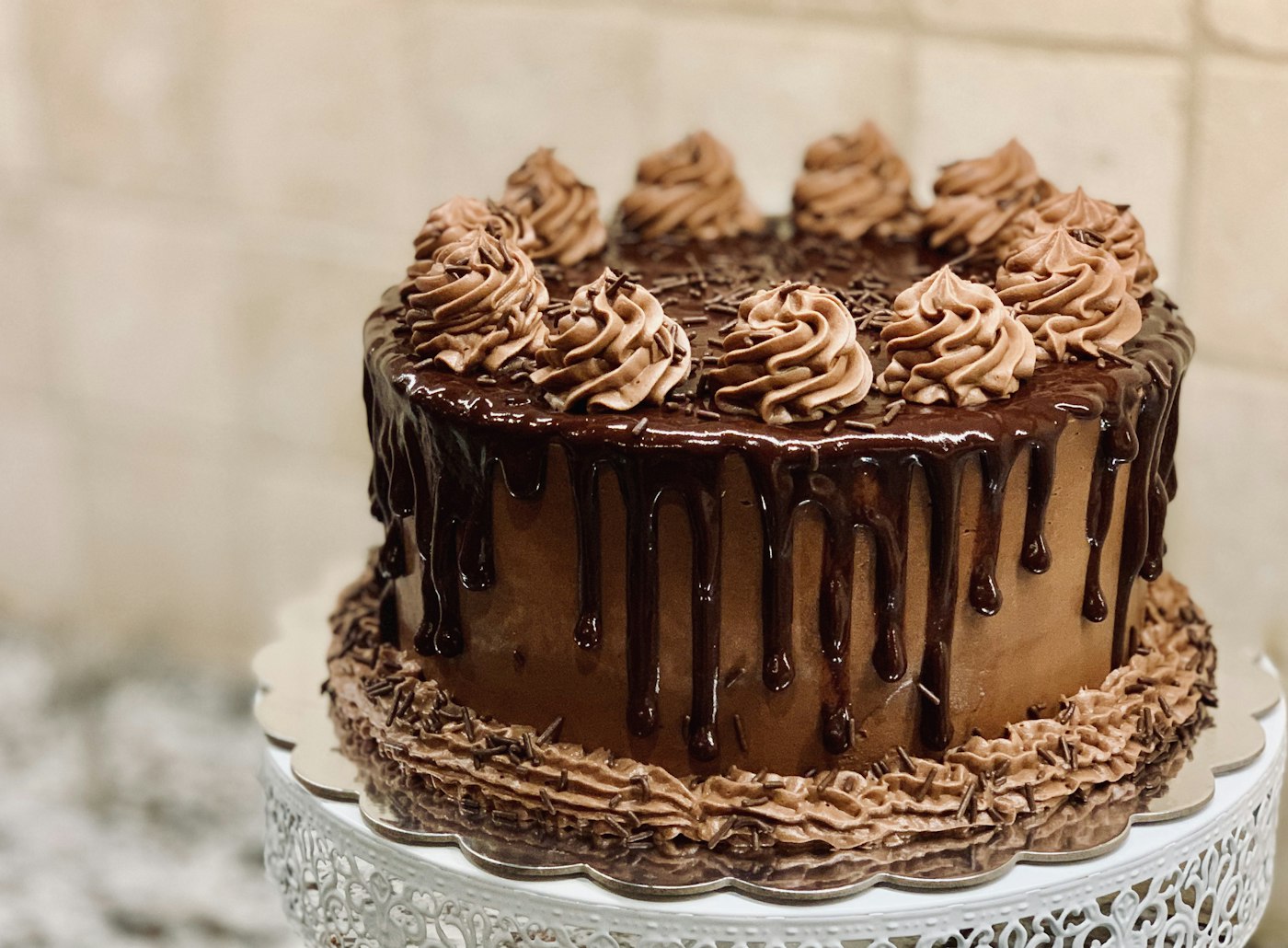
“When you honestly describe a relevant image, the keywords show up on their own. That's the whole trick.”
The rules worth remembering
Keep it under about 125 characters. Some screen readers cut off around there. One clear sentence beats a paragraph.
Don't start with 'image of' or 'photo of'. The screen reader already announces it's an image. Jump straight to the content.
Decorative images get empty alt text. Divider swooshes and background textures should have alt="" (empty on purpose), which tells screen readers to skip them instead of announcing junk.
Images that are links must describe the destination. If your logo links to the homepage, the alt text is 'Company name — home', not a description of your logo art.
Text inside images needs to be in the alt text. If your promo banner says '20% off through Friday', the alt text must say it too — otherwise screen reader users literally cannot get the offer.
Not sure whether an image even needs alt text? Follow the arrows:
Does alt text really affect SEO?
Yes, in two measurable ways. First, Google Image Search is enormous — for products, food, decor, fashion, and anything visual, image results drive real traffic. Your images can't rank if Google doesn't know what they show. Second, alt text is one of the signals Google uses to understand your page overall. A page about wedding photography whose images are all confirmed wedding photos is a more convincing result than one full of unlabeled files.
Google's own image best practices say it directly: they use alt text along with page content to understand the subject of images.
To be clear about scale: alt text alone won't take you from page five to page one. It's one signal among hundreds. But it's a signal you fully control, it takes seconds per image, and it stacks with every other good practice. Small businesses win at SEO by collecting exactly these kinds of small, controllable advantages.
How to fix your site this week
Make a list of your pages, starting with the money pages: home, services or products, contact.
For every image, ask: does this add information? If yes, describe it in one phone-call sentence. If it's decoration, mark it decorative (empty alt).
Do the images with text in them first — promos, banners, menus. Those are the worst accessibility failures.
Fix your logo and any linked images so the alt text says where the link goes.
Going forward, write the alt text the moment you upload an image. Ten seconds now beats an audit later.
On most platforms the alt text field is in the image settings when you click an image in the editor. If you're on StoryPress, every image field asks for alt text as you add the image — and because your site also publishes a clean text version of every page for AI assistants like Claude and ChatGPT to read, your image descriptions become part of how those tools understand and recommend your business. Describing your images well is no longer just about Google.
Either way: open your homepage right now and check your first three images. If one of them is named something like IMG_4302, you know what to do.
One practical website guide like this, every day

Your Website Just Got an AI Co-Pilot: The StoryPress MCP Server
What if your website could talk to an AI that actually understands it — not just the code, but the content, the structure, the design system? That’s what the StoryPress MCP server makes real. It’s the bridge between conversational AI and your live site, and it changes everything about how you build, edit, and maintain your web presence.